
Calm, structured play for every learner in your care
One organisation account holds all your learners, arranged in groups, with a staff area behind a PIN for reports and play observations. Sensory settings and "first, then" plans for each learner, Calm Cove for practising calming, goals and notes, and optional sharing between your tablets. The same 436 games, 50 read-along stories, Star Cadets maths and Play Studio that families use, with no ads and nothing to distract.
- 14-day free trial
- Data stored in Australia
- No ads or tracking
Everything a busy room needs, nothing it doesn't
Set up as a school or preschool, therapy centre, autism centre or another organisation, choose a plan size, and add learners as they join.
Many learners
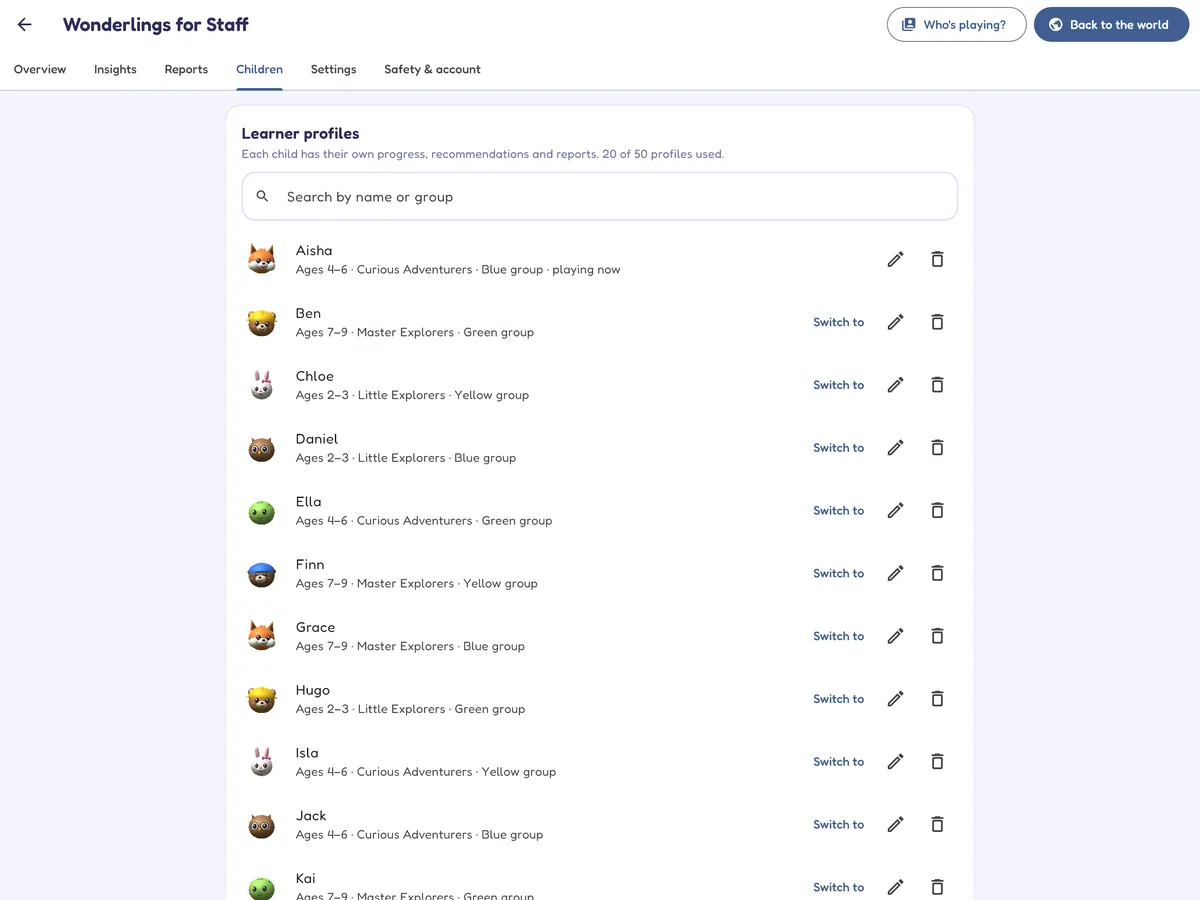
Up to 15, 50 or 150 learner profiles depending on your plan, or more by arrangement. Each learner has a nickname, age and avatar, with their own levels and progress. Children don't need email addresses.
Groups and classes
Give each learner a group name, such as a class, a room or a therapy group, so the right child is quick to find at the start of a session.
A staff area behind a PIN
Reports, Insights, settings and the account live in a staff area that needs a six-digit PIN, kept apart from the children's world.
Across your devices
Sign in with your organisation account on another tablet and your learners and their progress come with you. Switch on sharing, with consent confirmed, and their play details, settings, plans, goals and notes follow them too. Each device has its own PIN.
Calm by design
No ads, chat or links out of the app in the children's area. An "I need a break" button is always there, a session timer you set ends play with a restful break screen, and Calm Cove has no scores or timers at all.
Seven languages
English, Spanish, French, German, Italian, Brazilian Portuguese and Simplified Chinese, with spoken instructions for children who are not yet reading.
Across the curriculum
Maths (including 72 Star Cadets missions), English reading and writing (in English), science, history, geography, music and first words in Spanish, French, German and Chinese, alongside games about feelings, turn-taking and friendship.
Predictable, gentle rewards
Stickers for trying new things, with no streaks, leaderboards or lives. Sticker pop-ups can be switched off for learners who prefer no surprises.
Adapts to each learner
Every game has several levels and moves up or down as a learner plays, with a hint when they're stuck and nothing to lose for a wrong answer.
Sensory settings, picture plans and a break button
Every learner can have their own settings, so a child who finds sound or movement too much, or needs a predictable routine, gets a Mellowmoor that suits them on any tablet they use.
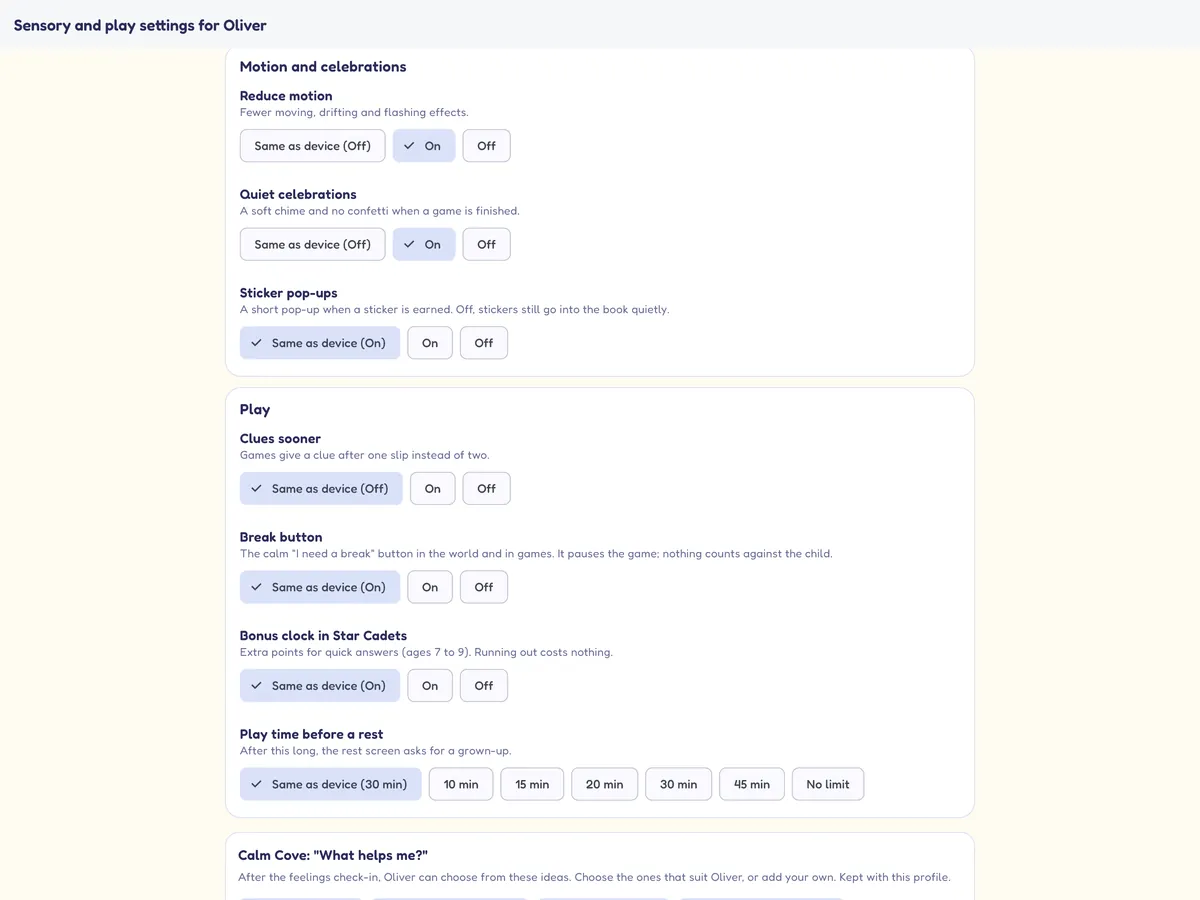
- Sensory and play settings per learner: spoken instructions on or off, a slower voice, sound effect and music levels, reduced motion (still scenes instead of moving ones), quieter celebrations with a soft chime and no confetti, sticker pop-ups off, clues sooner, the break button, play time before a rest and the Star Cadets bonus clock. Anything not set follows the device.
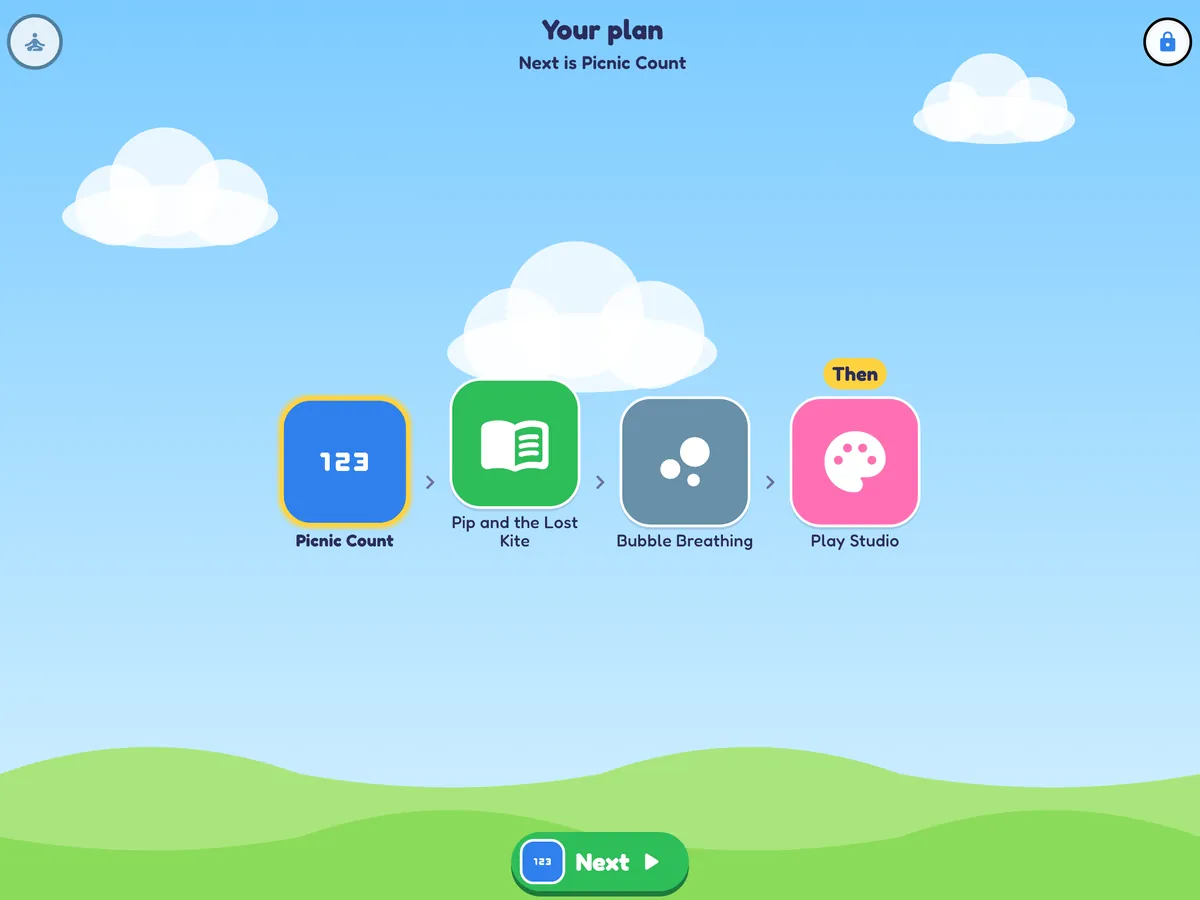
- "First, then" session plans: staff choose 2 to 6 activities and an optional "then" activity. The learner sees a strip of pictures and a big Next button, and the plan starts again each day until you change it. Lock it with the staff PIN, or leave it as a suggestion.
- "I need a break": a calm button always in the same place. It pauses the game without counting against the learner, and the break screen offers "I'm ready", "I'm finished" or "Go to Calm Cove". Breaks are counted in Insights.
A quiet place to practise calming
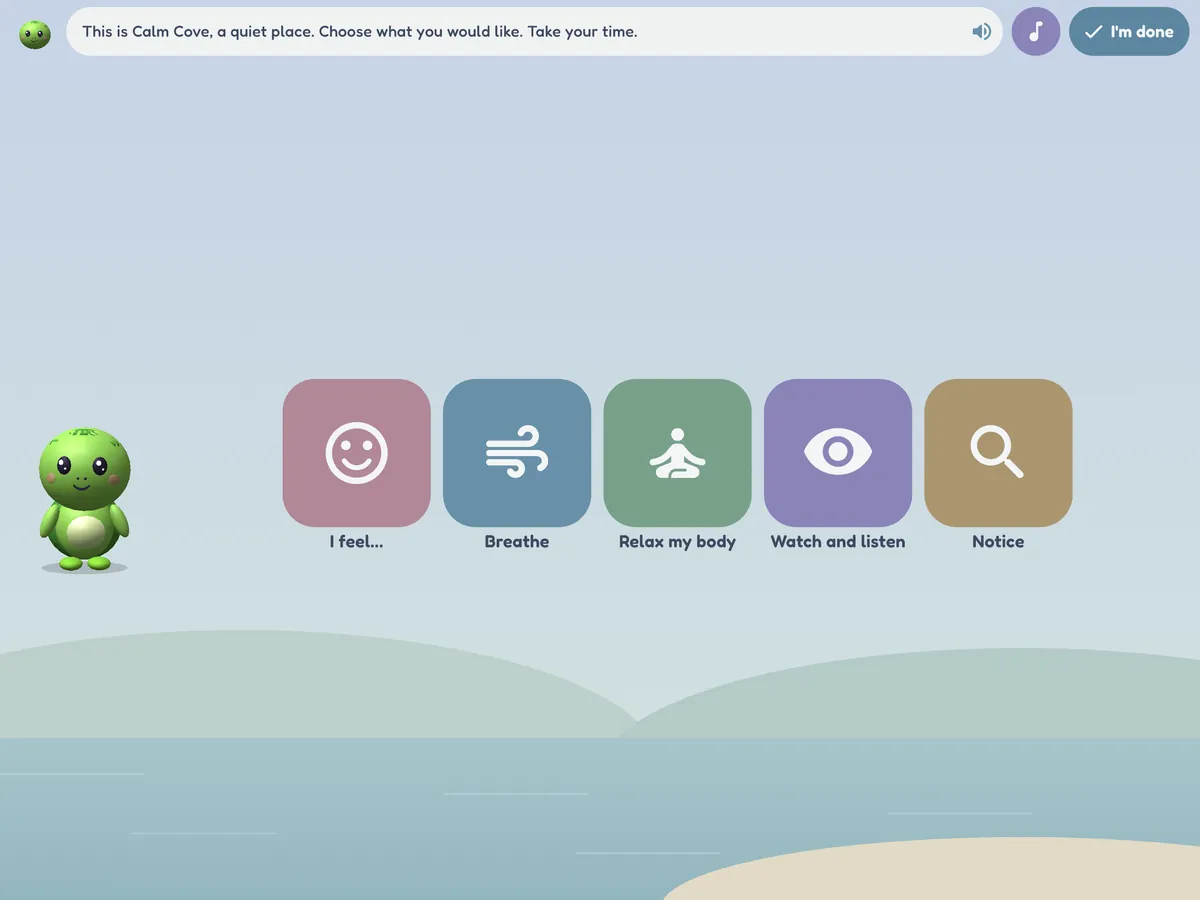
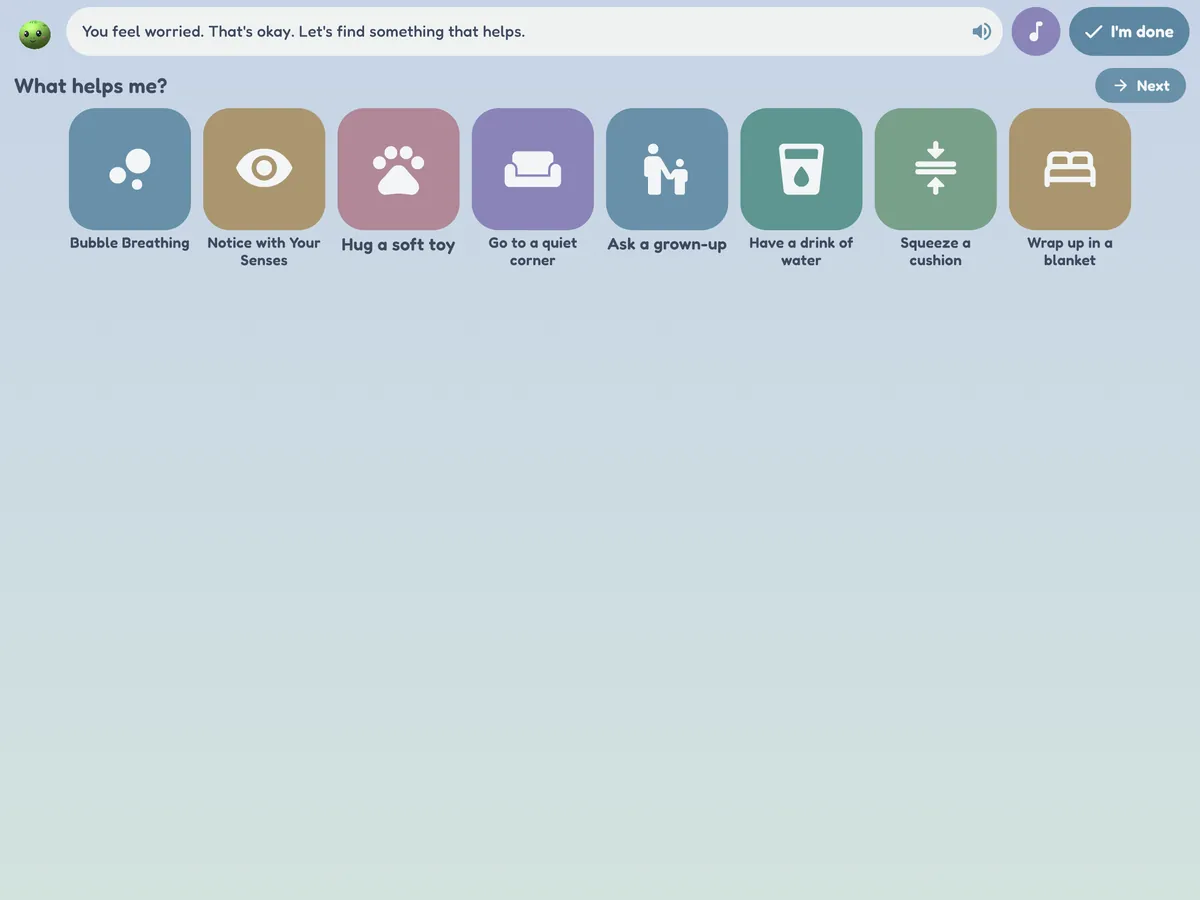
Calm Cove gives learners 18 simple activities, hosted by Tilly the turtle, that can help them practise calming in a session or a quiet corner.
- Six kinds of slow breathing, squeeze and let go, a body scan, animal stretches, 5-4-3-2-1 senses and a calm-colour search.
- Slow scenes to watch (fish tank, glitter jar, rain, clouds, lava lamp) and quiet music.
- A feelings check-in, then a "What helps me?" board. Staff choose the ideas for each learner, such as a soft toy, headphones or a quiet corner, and can add up to four of their own.
- Soft colours, still scenes with reduced motion, no scores, timers, fanfares or sticker pop-ups, and "I'm done" always ends an activity.
- Insights show plain counts: Calm Cove activities used, which ones most, and the feelings chosen in check-ins.
Calm Cove offers tools to practise calming. It makes no therapeutic or clinical claim and is not a treatment; use it alongside your own practice and each learner's plan.
One learner, any of your tablets
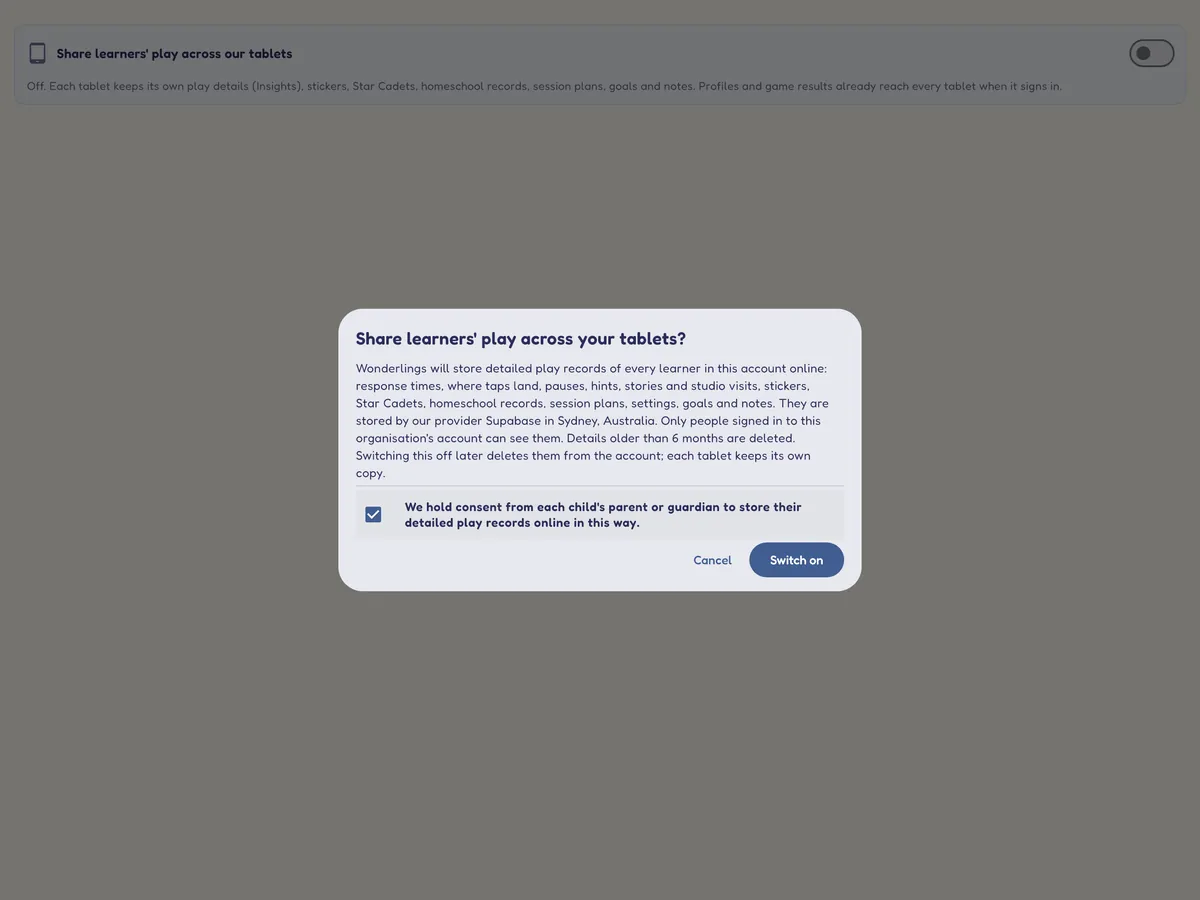
Learners often move from tablet to tablet in a clinic or classroom. Switch on Share learners' play across our tablets in the staff area, and each learner's play details, settings, session plan, goals and notes, stickers, Star Cadets and homeschool records follow them to every tablet signed in to your organisation.
- Consent first: before it can be switched on, the account owner confirms that your organisation holds consent from each child's parent or guardian to store detailed play records online. We record who confirmed it and when.
- Stored in your organisation's account in Sydney, Australia, and visible only to people signed in to it.
- Play details older than 6 months are deleted automatically. Switching sharing off deletes everything shared from the account at once; each tablet keeps its own copy.
- Off unless you switch it on, and never available to family accounts: families' play details stay on their device.
Follow what each learner is working on
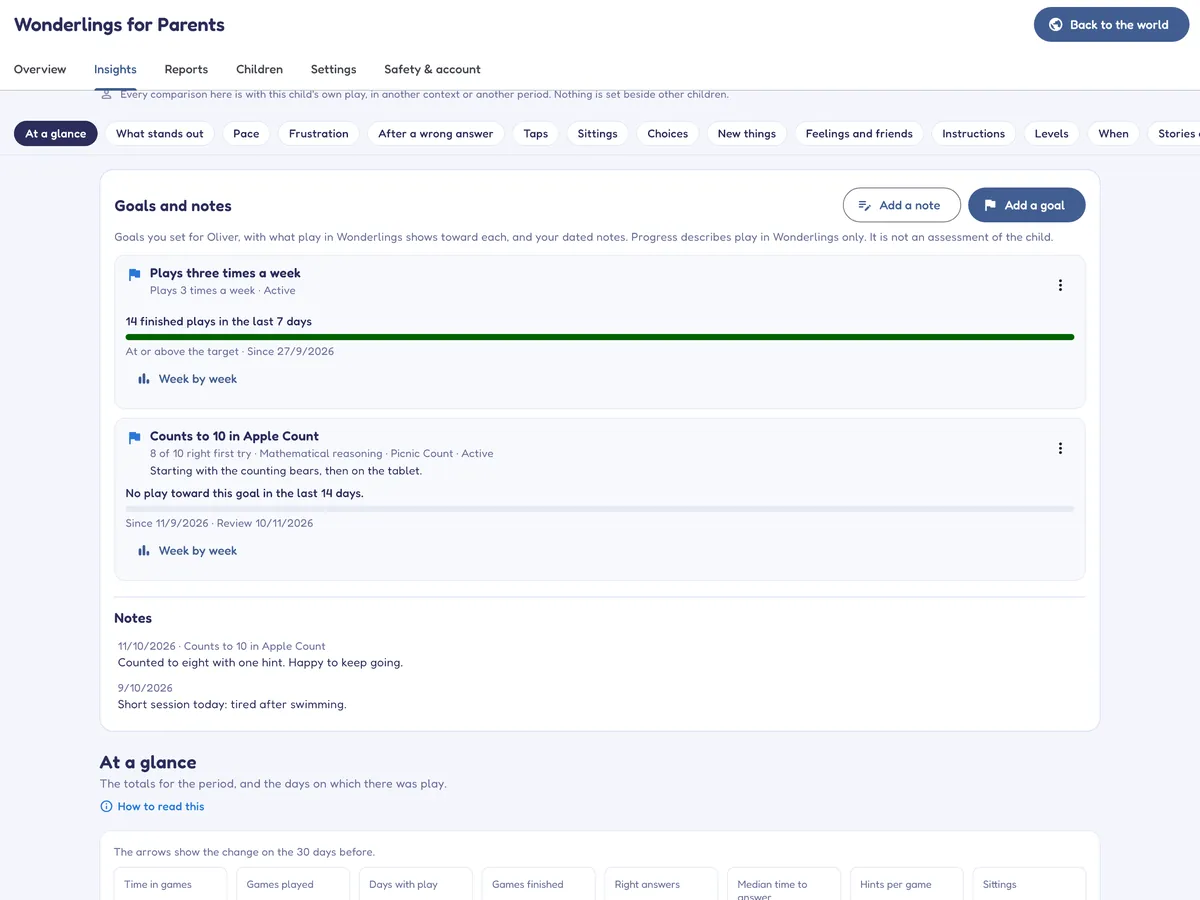
Set goals for a learner, such as "Counts to 10 in Apple Count", with a target like 8 of 10 right first try, a share of right answers or a number of plays a week, and a review date. Add dated notes along the way.
- Each goal shows what play in Mellowmoor shows toward it, with a week-by-week chart.
- Goals and notes appear in Insights, on the overview and in the Play Observation Report.
- Progress describes play in Mellowmoor only. It is not an assessment of the child.
Observations of play, never an assessment
When recording is switched on, Mellowmoor notes on the device how each learner plays: how long answers take, where taps land, pauses, use of hints and replays, what follows a wrong answer, whether games are finished, time spent in stories and Play Studio, breaks asked for, and which Calm Cove activities were used.
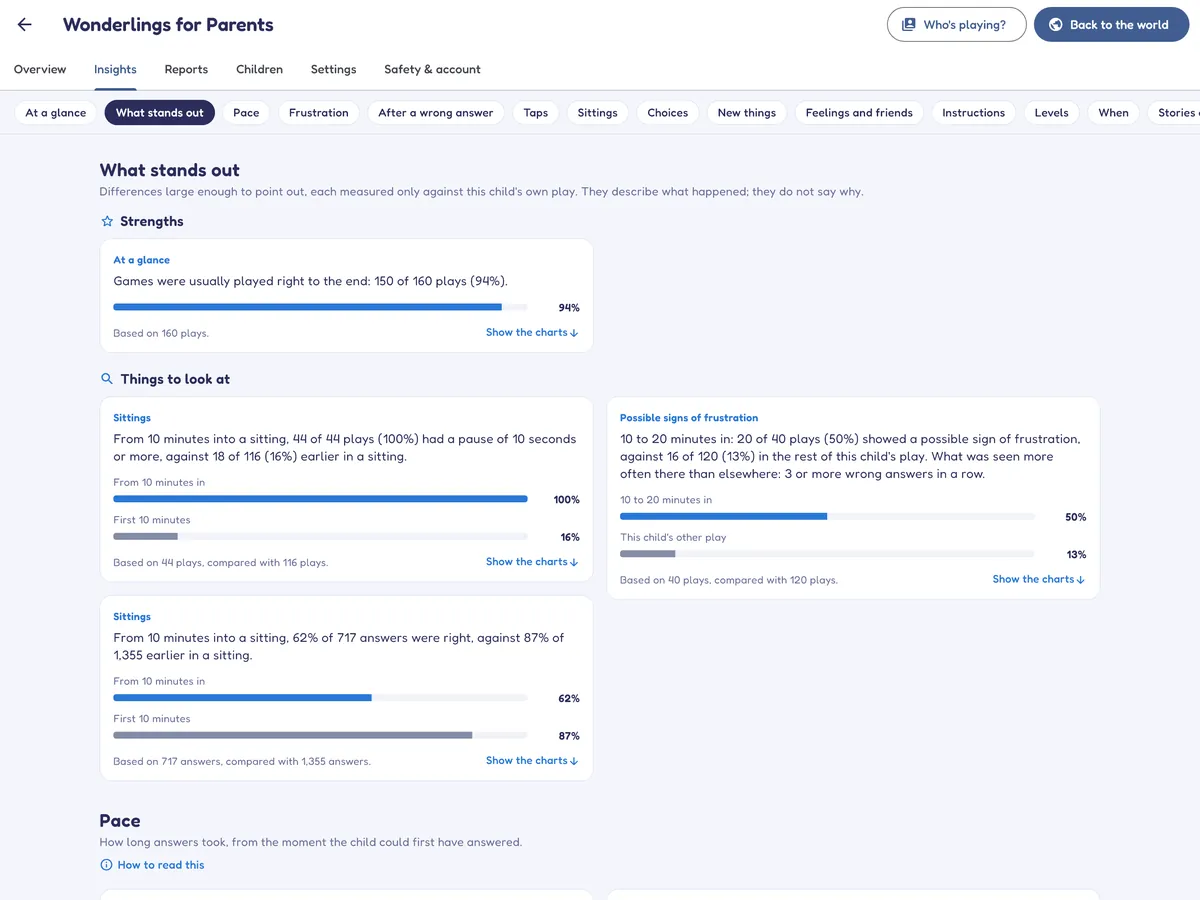
The Insights tab turns this into thirteen sections of figures and charts, from pace and stamina to choices, listening and change over time, with a short list of what stands out.
- A learner is only ever compared with their own play. There are no age norms, no rankings and no comparisons with other children.
- Every figure says how much play it rests on, and is held back when there is too little. A difference is only pointed out when it is large and unlikely to be chance.
- No condition is named anywhere, and nothing is combined into a score.
- Play details stay on the device unless your organisation switches on sharing between its own tablets (with consent confirmed) or a member of staff exports a report.
The Play Observation Report
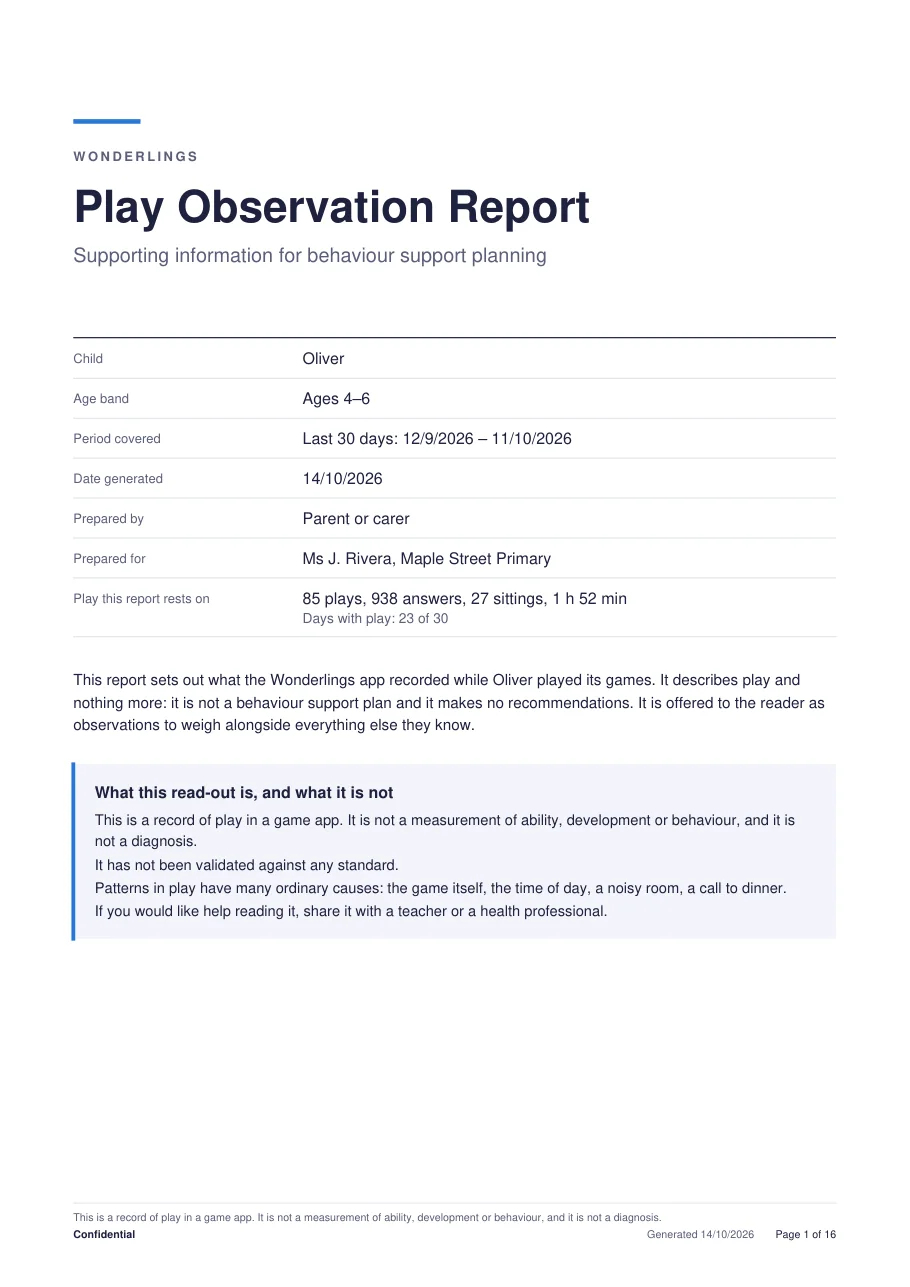
A PDF of about sixteen pages for a period you choose (the last 7, 30 or 90 days, or all recorded play). The cover says who prepared it and who it is for, and what it rests on. It sets out a summary, where possible signs of frustration appeared (with the five things counted defined in plain words), what happened straight after a wrong answer, pace, where taps landed and more, each with a "How to read this" note.
It is subtitled "Supporting information for behaviour support planning", and it is exactly that: observations for a professional to weigh alongside everything else they know. It makes no recommendations. It is shared through the device's own share sheet, so it goes only where you send it.
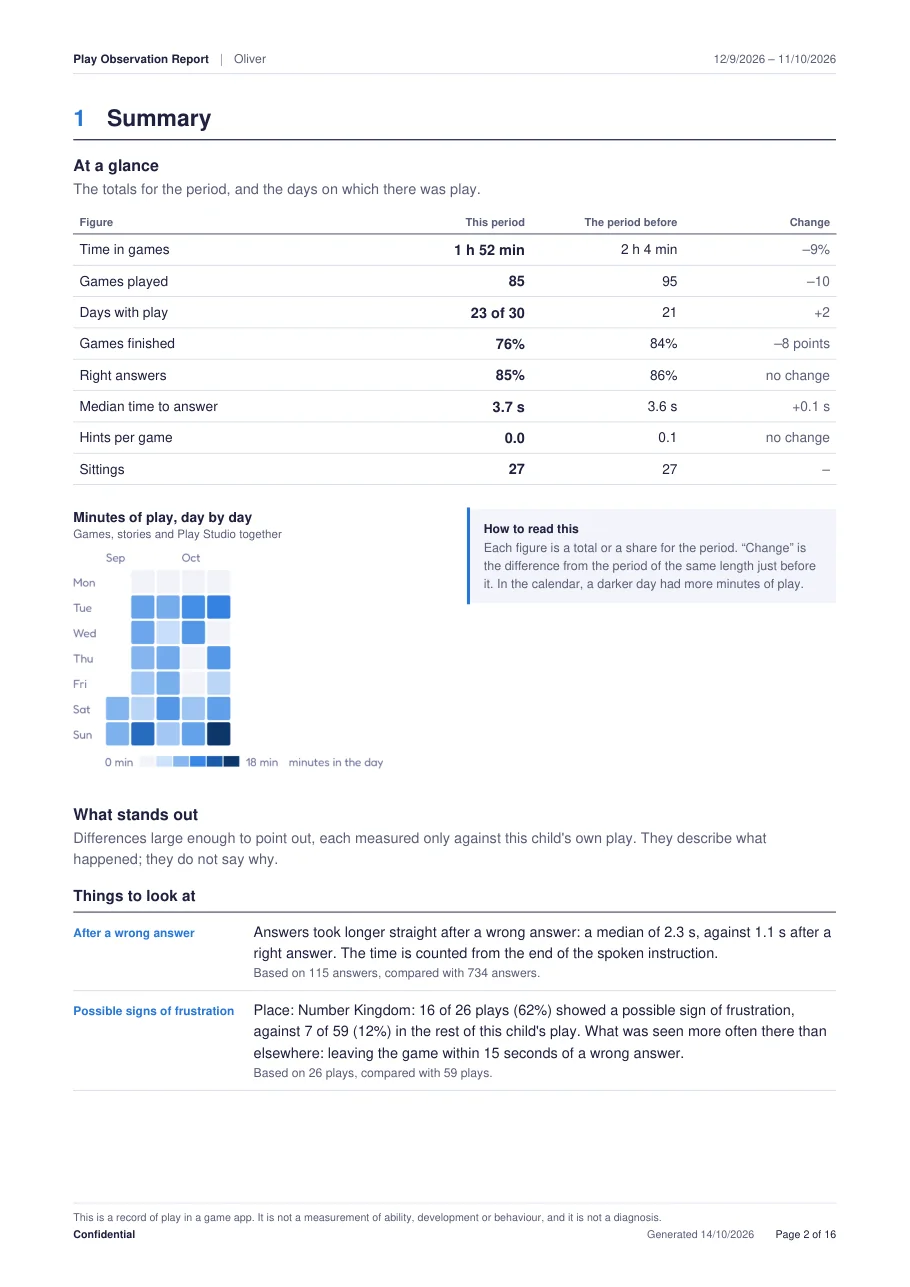
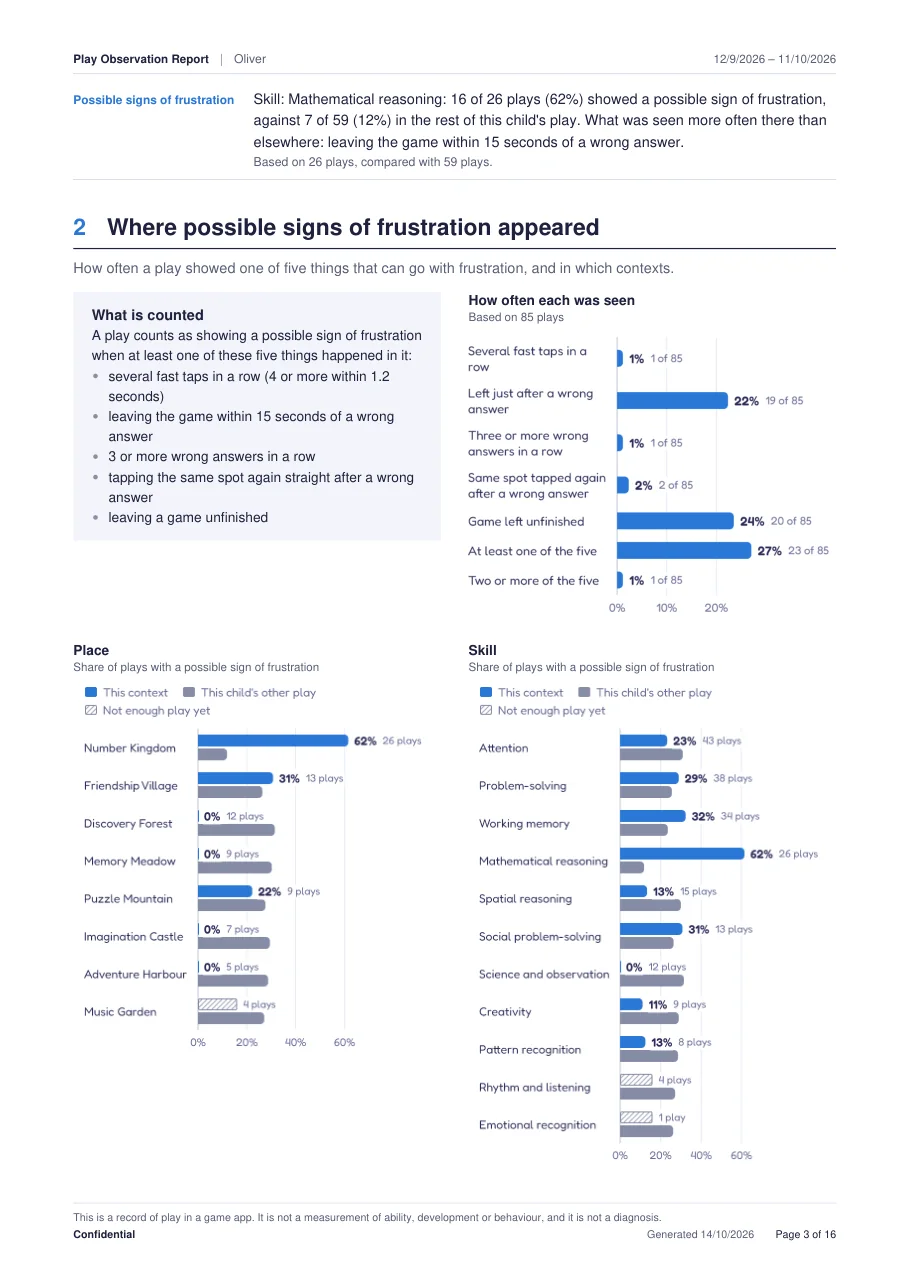
Pages from an example report. The child and all figures are made up.
What this read-out is, and what it is not
This is a record of play in a game app. It is not a measurement of ability, development or behaviour, and it is not a diagnosis.
It has not been validated against any standard.
Patterns in play have many ordinary causes: the game itself, the time of day, a noisy room, a call to dinner.
If you would like help reading it, share it with a teacher or a health professional.
The app's own wording, shown at the top of the Insights tab and on the first page of every report.Priced by the number of learners
Every plan includes all 436 games, 50 stories, Star Cadets, Language Lighthouse, Calm Cove, Play Studio, Music Corner, reports, Insights, goals and notes, and sharing between your tablets, and starts with a 14-day free trial.
| Plan | Learner profiles | Price | How it is billed |
|---|---|---|---|
| Small | Up to 15 | US$39 a month | Monthly by card (website), or App Store or Google Play |
| Medium | Up to 50 | US$99 a month | Monthly by card (website), or App Store or Google Play |
| Large | Up to 150 | US$249 a month | Monthly by card (website), or App Store or Google Play |
| Larger | More than 150 | By arrangement | Invoiced directly. Contact us |
You choose a plan size when you set up, and can move up later in the staff area under Safety & account. Prices are in US dollars; local tax may apply, and the checkout shows the total before you confirm. See pricing for trials, renewals and cancelling.
Android tablets without Google Play accounts? Download Mellowmoor for Android straight from our website and pay monthly by card in the app: one organisation account and one subscription for all your tablets. How to set up many tablets.
Your learners' information, handled with care
For each learner, the account keeps only a nickname, age, avatar, group name and game progress, stored with our hosting provider in Sydney, Australia. Play details (including Calm Cove check-ins), settings, plans, goals and notes stay on the device, unless you switch on sharing between your tablets after confirming each family's consent. Pictures, the story log and the staff PIN always stay on the device.
Your organisation decides which children use Mellowmoor and is responsible for getting consent from each child's parent or guardian; the app asks you to confirm this during setup. We handle the information on your behalf, only to provide Mellowmoor to you.
You can delete a learner, their play details or the whole organisation account from the staff area. If your organisation needs a data processing agreement, contact us.
Can each member of staff have their own login?
Not at the moment. Staff use the organisation's account, and each device has its own PIN for the staff area.
What happens to shared play if we switch sharing off?
Everything shared is deleted from your organisation's account straight away. Each tablet keeps the copy it already has, and learners' profiles and game results still reach every tablet that signs in.
Is Calm Cove a therapy tool?
No. It offers simple activities for practising calming, such as slow breathing, stretches and quiet scenes to watch. It makes no clinical claim. It can be one option in a calm corner or during a break, alongside your own approach.
Can we change the size of our plan?
Yes, in the staff area under Safety & account. You can't move to a size that allows fewer learners than you already have.
Can you invoice us instead?
For the Larger plan, yes: we arrange the price and invoicing directly. Small, Medium and Large plans are paid monthly by card in the Android app from our website (with an emailed receipt), or through the App Store or Google Play.
Can we use the report for assessments or funding applications?
The report is a record of play, not an assessment, and has not been validated against any standard. A qualified professional may choose to weigh it alongside their own observations, but it should not be used on its own to make decisions about a child.
Try it with your group
Download Mellowmoor, choose "School or centre" during setup and use every feature free for 14 days.